
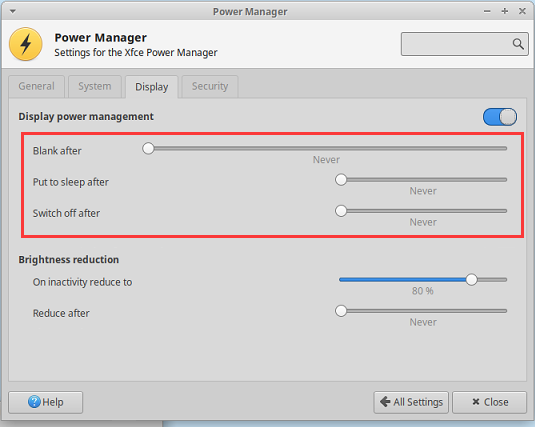
1、修改电源管理
在设置中打开【Power Manager】->【Display】,将【Blank after】、【Put to sleep after】、【Switch off after】设置为0
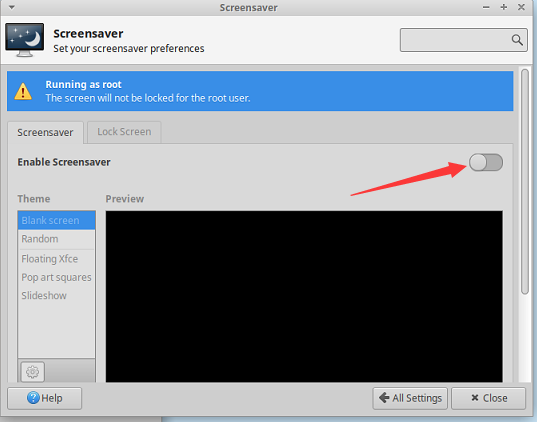
2、修改屏保
在设置中打开【Screensaver】->【Screensavert】关闭Enable Screensaver
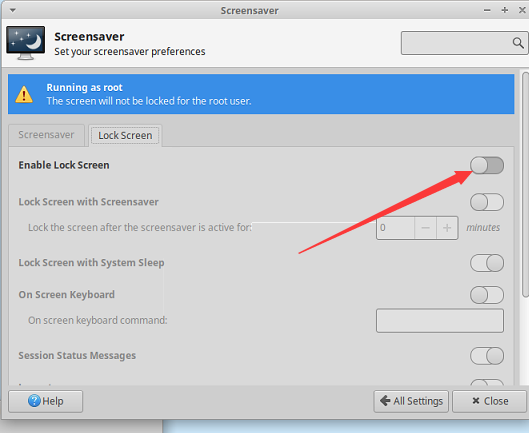
在设置中打开【Screensaver】->【Lock Screen】关闭Enable Lock Screen
root用户需要额外设置下面的内容:
-
在/etc/X11/xorg.conf文件中,添加以下内容
Section "ServerFlags" Option "BlankTime" "0" Option "StandbyTime" "0" Option "SuspendTime" "0" Option "OffTime" "0" EndSection -
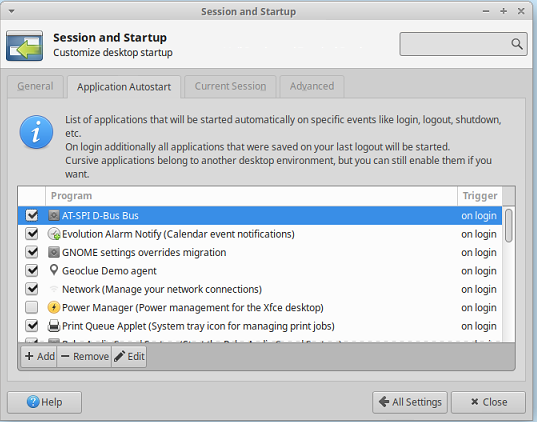
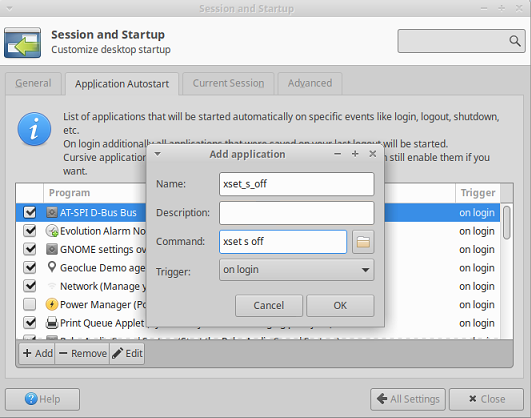
在设置中打开【Session and Startup】->【Application Autostart】
-
-
添加name为xset_s_off,Command为xset s off
-
然后在~/.config/autostart 文件夹下修改文件 xset_s_off.desktop为
[Desktop Entry]
Encoding=UTF-8
Version=0.9.4
Type=Application
Name=SS
Comment=SS
Exec=xset s off
OnlyShowIn=XFCE;
StartupNotify=false
Terminal=false
Hidden=false